Header image  


A collection of various projects.


    home
 
A Dual Zone 'accurate clock'

It's nice to have a clock in the Ham Radio shack that gives UTC and local time. Even nicer, a digital one with a reasonable sized TFT display.

NEW NTP Clock using CYD (Cheap Yellow Display )

NEW Jan 2025, a NIXIE Tube display version !

I take absolutely NO credit for this project. It's based (ie copied) on a project from Bruce Hall, W8BH. I came across this project on the SoftwareControlledHamRadio Groups.io group where Bruce posted links to his project. Thanks Bruce. (Bruce has a number of cool clock projects on his web pages. http://www.w8bh.net/clocks.pdf )

It's highly configurable for your time zone and also automatic daylight saving time. It gets it's time from any of the various NTP time services available around the world. The micro Bruce uses, has in-built WiFi so can connect to these servers. Assuming you have a connection to the WWW of course.

Perfect in other words.!

See http://www.w8bh.net/NTP_DualClock.pdf Full details of the clock and how it works.

Bruces Github software for this project.


VK3PE's IMPLEMENTATION:


NEW: See also, my NTP NIXIE Clock project here. Jan 2024


Bruce's project uses a 2.8" 320x240 ILI9341 TFT display which I happened to have available.

He uses an ESP32 'Feather' for the micro. I didn't have that board but did have two other ESP32 boards in my collection for other projects. (simpleSA and FT-7 VFO) I also had a a couple of PCB's from those projects so implementation of the clock was very simple for me to try it out.

I tried both of the ESP32 boards I had and both worked. Note that you need to install a couple of new LIBraries which are given in the source code. Some changes to the TFT_eSPI.LIB are required but are detailed on Bruce's pages.

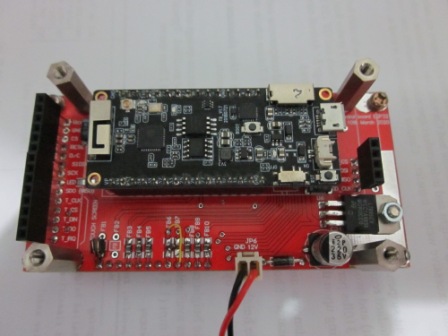
This is the ESP32 VROOM module mounted on a re purposed 'simpleSA' board I had available.

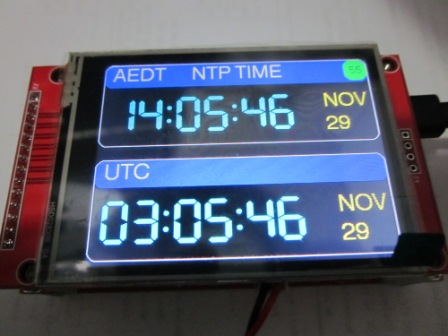
And the clock working:

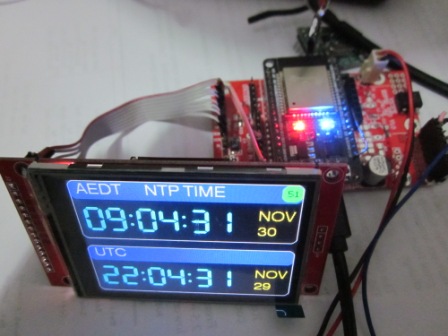
And an ESP32 WROOM-32 board on another of my project boards.

The small green area at top right shows the WiFi signal strength. Of course, one can elect to modify Bruce's screen layout in the source code, to suit your own whims.

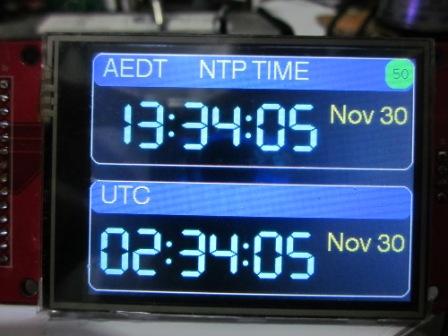
eg Change the format of the date: (Later, I changed the seconds to a smaller font as I think it's nicer that way)

The software is very flexible and for example, you can elect to show the time in 12hr format.

This is an ILI9341 display.

Thanks also to WA2FZW and G3ZQC (sadly now SK) for fixing a couple of bugs in the original code. (The Github link on this page will be updated soon.)


NEW August 2025 CHEAP YELLOW DISPLAY

A version for a CYD. The CYD is a board that combines an ESP32 with a nice TFT display using the ILI9341 driver. These displays are generally 2.8" type although some other sizes are also available. You can find them by searching for CYD or ESP32-2432S028. They have a touch screen (TS) which is usually of the resistive type, although TS is not used here. For those with the knowledge, the TS could be used to select other time zones or whatever you wish.

A few changes need to be made to the TFT_e_SPI Library in order for this to work as the CYD is not covered. For those not familiar with this LIB, it needs to be changed when compiling for different types of controller chips in the display.

If you don't have this TFT_eSPI Library, download it first. I am assuming you are familiar with Arduino IDE and Libraries.

As the CYD is not normally catered for, an additional file for the CYD needs to be added to the LIB. When Installed the LIB is normally in the Documents/Arduino/libraries directory.

In the User_setup_select.h file,open it with Word or a text editor and disable any other active .h files using // in front of them. Then add this line to the file 'ESP32_Cheap_Yellow_Display.h' and save it. (This was developed by WA2FZW)

Then, in the User_Setups DIRECTORY, add the following file into the list....from here. Right click to save.

The new Code for the NTP clock with CYD, is here. (ZIP file, right click to save) These displays vary some what according to the actual supplier so, in some cases, the CYD colours may seem weird. Below are the correct colours. If not correct, this can usually be corrected by changing the "tft.invertDisplay (false);" to true in the code.

Compile the code and test it out to see if the colours look OK, if not, refer to the previous paragraph. Then compile & upload again.

(NOTE: what appears to be a purple hue is actually BLUE.)

CYD NTP Clock using the Code in link above.

Rear of the CYD.


73's

VK3PE (see QRZ.com)


This project is based on the excellent work by W8BH & WA2FZW. Both have Github accounts.

Page created by vk3pe (QRZ.COM) on 30th Nov, 2020

Last updated on August 22, 2025 [CYD added. ]

Information here is presented in good faith and based on what the author has made.

Any mention of a trademark is unintended.